🔥 One of Our Most Popular Galactic Gleam 35K Devices Is Now Just $11.49 — US Warehouse

Sign in
If you do not have an account, click Create AccountCreate Account
ARE YOU OF LEGAL SMOKING AGE?
Some items are no longer available. Your cart has been updated.


This discount code cannot be used in conjunction with other promotional or discounted offer.

When purchasing a VAPEPIE vape, one of the most important steps is checking whether the product is genuine. A quick authenticity verification helps adult users avoid suspicious products and provides greater confidence before use.
This guide explains how to verify a VAPEPIE vape using the official security code or QR code found on the product packaging.
Important Notice:
VAPEPIE products contain nicotine. Nicotine is an addictive chemical. VAPEPIE products are intended for use only by adults of legal smoking age.
As VAPEPIE products become increasingly popular, counterfeit products may appear in some markets. These unauthorized products may use misleading packaging, inaccurate product information, or fake authentication labels.
Verifying your VAPEPIE vape can help you:
Before purchasing, you can also review the official VAPEPIE product list to compare available devices, specifications, and flavors.
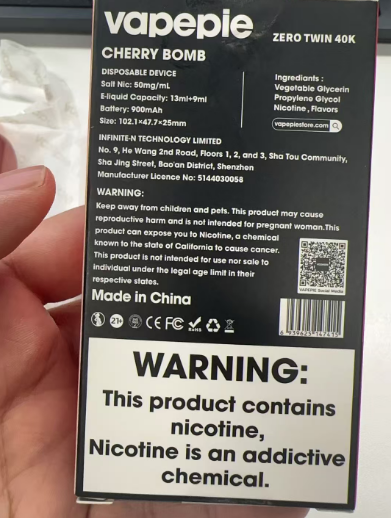
The VAPEPIE security code is usually located on the side of the product package.
Follow these steps to find it:
You may also find a QR code near the security code. You can scan this QR code with your smartphone to begin the verification process.
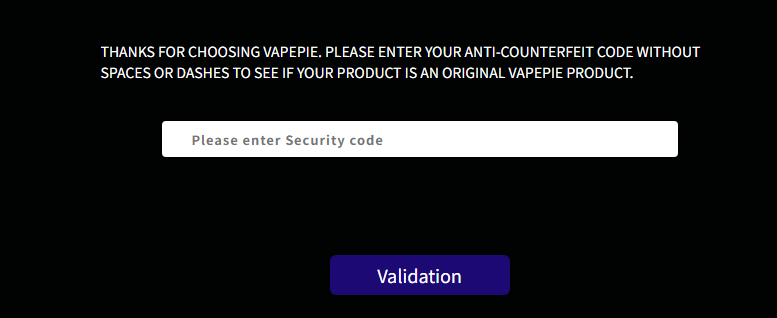
There are two ways to verify your VAPEPIE product.
Option 1: Enter the 18-Digit Security Code
Follow the instructions provided based on the result.
Option 2: Scan the QR Code
If the result appears unusual, the code has already been used, or the packaging looks suspicious, do not continue using the product.
Before purchasing a VAPEPIE vape from a local store or retailer, carefully inspect the product packaging.
A genuine VAPEPIE package should include:
Be cautious if you notice:
If you want to find a nearby retailer, use the official VAPEPIE “Store Locator” page. Product availability and flavor selection may vary depending on location.
If your VAPEPIE vape does not pass verification, stop using the product and contact VAPEPIE official support.
You can visit the VAPEPIE Support and After-Sales Center for assistance.
If you believe you purchased a counterfeit product, submit details through the Report Counterfeit Product page.
For device quality issues, use the Warranty Claim service.
When contacting customer support, prepare the following information:
Providing complete information helps the support team review your case more efficiently.
Verifying your VAPEPIE vape only takes a short amount of time, but it is an important step before using the product.
Always remember to:
A simple authenticity check can help you avoid suspicious products and ensure that your VAPEPIE device is genuine.
For more product information, visit the VAPEPIE product list. To purchase locally, use the “Store Locator” feature. For assistance, contact the VAPEPIE Support Center.
How can I identify whether my VAPEPIE vape is authentic?
Visit the official VAPEPIE verification page and enter the 18-digit security code or scan the QR code located on the product packaging.
Where is the VAPEPIE security code located?
The security code is usually found on the side of the package, underneath a scratch-off coating near the QR code.
What should I do if my VAPEPIE verification code does not work?
Stop using the product immediately and contact VAPEPIE customer support. You can also report the suspicious product through the counterfeit reporting service.
Can I verify my VAPEPIE product before using it?
Yes. It is recommended to check the packaging and verify the product authenticity before use.
Is VAPEPIE verification necessary when buying from a retailer?
Yes. Even when purchasing from a store, checking the security code and packaging details can help confirm that the product is genuine.
Comment